If you’ve ever heard people talking about software testing or automation testing, two names come up again and again: Selenium and Playwright.
But what do these tools actually do?
How are they different?
And most importantly — which one should you choose and when?
Don’t worry. You don’t need a technical background to understand this article. Let’s break it down in the simplest possible way 😊
First Things First: What Is Automation Testing?
Imagine this 👇
You have a website like Amazon, Flipkart, or a banking app.
Before releasing it to users, the company must check:
- Does login work?
- Can users add items to cart?
- Does payment succeed?
- Does the app break after changes?
Instead of a human clicking the same buttons again and again, we use automation tools to do this work automatically.
👉 Selenium and Playwright are tools that behave like a robot user:
- Open a browser
- Click buttons
- Enter text
- Verify results
What Is Selenium? (In Simple Words)
Selenium is an old and very popular automation tool.
Think of Selenium like a manual car:
- Very powerful
- Works everywhere
- But you need more effort and experience to drive it well
Key Points About Selenium
- Launched around 2004
- Used by millions of testers worldwide
- Supports many programming languages:
- Java
- Python
- C#
- JavaScript
- Works on all browsers:
- Chrome
- Firefox
- Edge
- Safari
Simple Example
Imagine telling a robot:
“Open Chrome → Go to Google → Type ‘Shoes’ → Press Enter”
Selenium can do exactly this.
What Is Playwright? (In Simple Words)
Playwright is a new-generation automation tool created by Microsoft.
Think of Playwright like an automatic car:
- Faster
- Smarter
- Easier to use
- Less setup headache
Key Points About Playwright
- Released around 2020
- Built for modern web applications
- Supports:
- JavaScript / TypeScript
- Python
- Java
- C#
- Works out of the box with:
- Chrome
- Firefox
- Edge
- WebKit (Safari engine)
Simple Example
Instead of giving many instructions, Playwright understands:
“Click the login button when it appears”
It automatically waits for things to load — no extra effort needed.
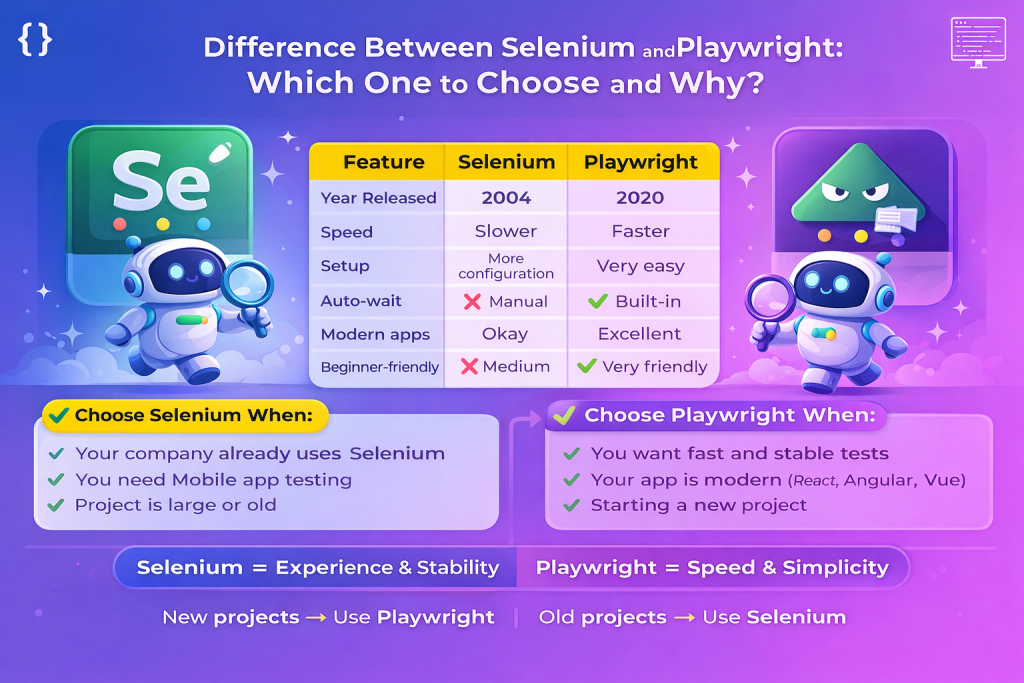
Selenium vs Playwright: Easy Comparison Table
| Feature | Selenium | Playwright |
|---|---|---|
| Year Released | 2004 | 2020 |
| Speed | Slower | Faster |
| Setup | More configuration | Very easy |
| Auto-wait | ❌ Manual | ✅ Built-in |
| Mobile testing | ✅ Yes (with Appium) | ❌ Limited |
| Modern apps | Okay | Excellent |
| Beginner-friendly | ❌ Medium | ✅ Very friendly |
Real-Life Example (Non-Technical)
Scenario: Booking a Movie Ticket 🎬
Using Selenium
- Selenium clicks the button before the page loads
- Page crashes ❌
- Tester adds extra waiting code
- More maintenance work
Using Playwright
- Playwright waits until the button is ready
- Then clicks
- Test passes smoothly ✅
👉 That’s why people say Playwright is smarter.
Which One Should You Choose and When?
✅ Choose Selenium When:
- Your company already uses Selenium
- You need mobile app testing
- Project is very large and old
- Team has strong Selenium experience
Example:
A 10-year-old banking project → Selenium is safer.
✅ Choose Playwright When:
- You are starting a new project
- You want fast and stable tests
- Your app is modern (React, Angular, Vue)
- You want less code and less maintenance
Example:
A startup building a new web app → Playwright is perfect.
Why Many Companies Are Moving to Playwright
- Faster test execution 🚀
- Less flaky (less random failures)
- Easier for beginners
- Built-in screenshots, videos, and reports
- Better support for modern websites
That’s why Playwright is becoming very popular in 2024–2025.
Final Verdict (Simple Answer)
👉 Selenium = Experience & Stability
👉 Playwright = Speed & Simplicity
If you’re new to automation or starting a fresh project,
Playwright is the better choice.
If you’re maintaining an old system,
Selenium still makes sense.

![Read more about the article 10 Beginner Python Automation Projects to Boost Your Resume [2025 Guide]](https://www.mrwhotheengineer.com/wp-content/uploads/2025/07/10-Beginner-Python-Automation-Projects-to-Boost-Your-Resume-2025-Guide-300x169.png)
![Read more about the article Python Automation Testing Roadmap [2025] – 3 to 6 Months Plan to Land a QA Job](https://www.mrwhotheengineer.com/wp-content/uploads/2025/06/ChatGPT-Image-Jun-21-2025-11_49_37-PM-300x200.png)