This Android Program shows a Notification Application.
Below is the source code of the Program to shows a Notification Application. The program is successfully run.
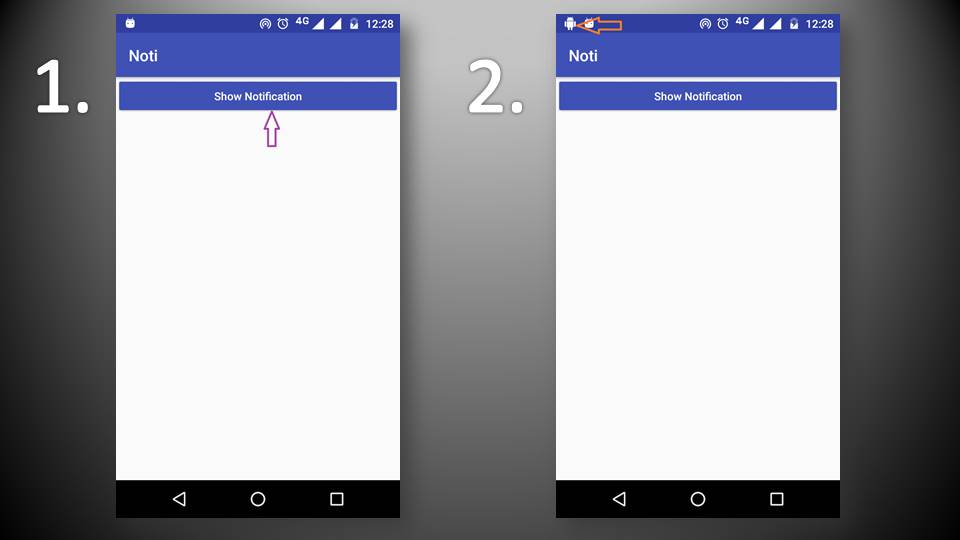
4)Output
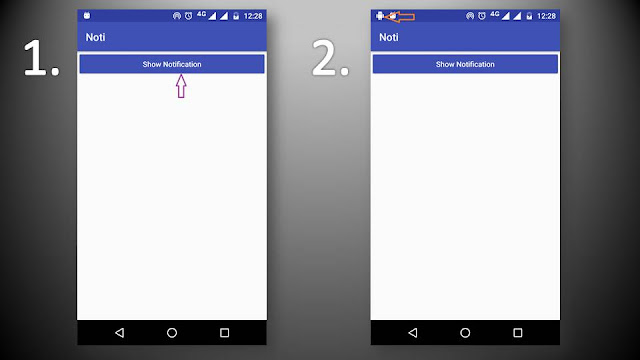
Below is the source code of the Program to shows a Notification Application. The program is successfully run.
How to create Android Wikipedia app in android studio
1)MainActivity.java(change your package name)
package com.example.pradeep.noti;
import android.app.Notification;
import android.app.NotificationManager;
import android.app.PendingIntent;
import android.content.Context;
import android.content.Intent;
import android.graphics.Color;
import android.support.v7.app.AppCompatActivity;
import android.os.Bundle;
import android.support.v7.app.NotificationCompat;
import android.view.View;
import android.widget.Button;
public class MainActivity extends AppCompatActivity
{
private Button btnShowNotification;
@Override
protected void onCreate(Bundle savedInstanceState)
{
super.onCreate(savedInstanceState);
setContentView(R.layout.activity_main);
btnShowNotification = (Button) findViewById(R.id.btnShowNotification);
btnShowNotification.setOnClickListener(new View.OnClickListener()
{
@Override
public void onClick(View v)
{
NotificationManager notificationManager =
(NotificationManager) getSystemService(Context.NOTIFICATION_SERVICE);
// Create a Notification
NotificationCompat.Builder nBuilder =
new NotificationCompat.Builder(MainActivity.this);
new NotificationCompat.Builder(MainActivity.this);
nBuilder.setContentTitle(“New Message”);
nBuilder.setContentText(“Text Message”);
nBuilder.setSmallIcon(R.drawable.ic_android_black_24dp);
nBuilder.setColor(Color.BLUE);
nBuilder.setOngoing(true);
nBuilder.setPriority(Notification.PRIORITY_MAX);
// Click listener for Notification
Intent intent = new Intent(MainActivity.this, MainActivity.class);
PendingIntent pendingIntent = PendingIntent.getActivity(MainActivity.this, 3132, intent, 0);
nBuilder.setContentIntent(pendingIntent);
nBuilder.addAction(R.drawable.ic_android_black_24dp, “Read”, null);
// Show Notification
notificationManager.notify(3131, nBuilder.build());
}
});
}
}
2)activity_main.xml
<?xml version=”1.0″ encoding=”utf-8″?>
<RelativeLayout
xmlns:android=”http://schemas.android.com/apk/res/android”
xmlns:app=”http://schemas.android.com/apk/res-auto”
xmlns:tools=”http://schemas.android.com/tools”
android:id=”@+id/activity_main”
android:layout_width=”match_parent”
android:layout_height=”match_parent”
tools:context=”com.example.pradeep.noti.MainActivity”>
<Button
android:id=”@+id/btnShowNotification”
android:layout_width=”match_parent”
android:layout_height=”wrap_content”
android:text=”Show Notification”
android:textAllCaps=”false”
android:textColor=”@android:color/white”
android:backgroundTint=”@color/colorPrimary”/>
</RelativeLayout>
4)Output
Note:-Just copy and paste code into your IDE/Android Studio.Change package name.